Insert a blank page after every page of a PDF
Lecture slides, textbook chapters and worksheets come with no room to write. The quickest fix is a blank page after each page: the original on the left, your notes on the right, or the page on one sheet and the working on the next. PDFSpacer does this in one click, and the new pages can be plain, ruled, squared or dot grid.
It is free, needs no account, and the PDF never leaves your browser.
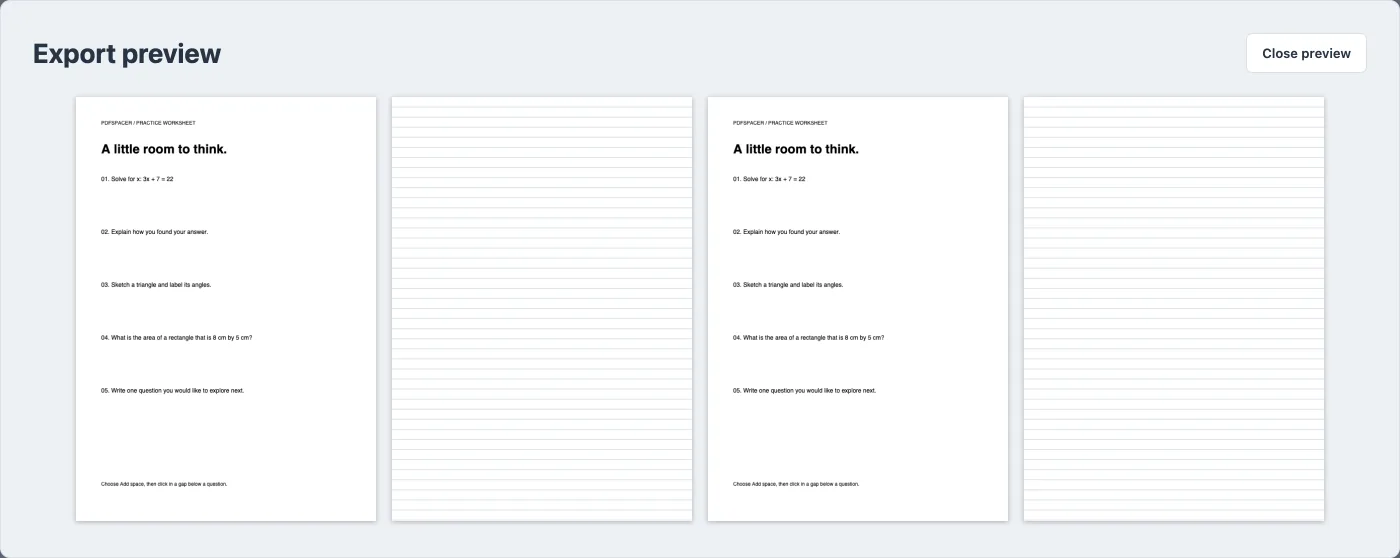
How to add a blank page after each page
- Open the PDF in PDFSpacer. Any PDF works, including scans and slide decks exported from PowerPoint or Keynote.
- Click Every page in the toolbar. Keep Full blank page selected and choose a paper style. Plain gives empty pages; Ruled lines, Squared paper and Dot grid give pages that are ready to write on.
- Click Add to every page. A page-sized spacer appears at the foot of each page. You can still drag, resize or delete any of them individually.
- Export as Paginated A4. The download alternates original page, blank page, original page, blank page. Choose Single long page instead if you want one continuous sheet with a page-sized gap after each page.
Blank pages for notes in GoodNotes or Notability
GoodNotes and Notability can add a blank page after the current one, but only one at a time, and the page uses the app's own template rather than one that matches your document. Users have asked both apps for an "add a blank page after every imported page" option for years. Running the PDF through PDFSpacer first gives you exactly that, and because the pages are part of the PDF they survive export, sharing and switching apps.
For a 40-slide lecture deck this takes a few seconds: open the PDF, choose Every page with dot grid, export, then import the result into your notes app. Each slide now has a full page of grid paper after it.
Printing with a blank page between pages
Teachers often print a reading or a past paper with a blank sheet after each page so students can annotate or answer alongside the original. Do this in PDFSpacer rather than at the printer: export as Paginated A4, then print double-sided. Each original lands on the front of a sheet with lined or squared paper on the back, or on the facing page if you bind the printout.
If the original is not A4, for example US Letter or a landscape slide, PDFSpacer scales it to the width of A4 and pads the leftover height so the inserted page always starts on a fresh sheet. Nothing is cropped and the text stays sharp, because pages are copied as vectors rather than re-rendered as images.
Half a page, or a custom amount of space
A whole page is sometimes more than you need. The Every page dialog also offers Half page, about 148 mm, and a custom height in millimetres. Slide decks printed six slides to a page usually need 60 to 90 mm under each page. The space is added at the foot of each page and flows across A4 sheets like any other spacer, so a half page of ruled lines simply follows the content.
Blank pages or space under each question?
A blank page after every page is the fastest option and suits notes and reading. For worksheets and exam papers you usually want the room directly under each question instead, so the answer sits next to what it answers. PDFSpacer does both: use Every page for the pages, then click below individual questions to add more space exactly where it is needed. See adding answer space to past papers and adding lines to a worksheet for that workflow.
Compared with a generic "add blank page" tool, PDFSpacer lets you pick the paper style, add the pages to every page at once, mix whole pages with smaller gaps, and preview the exact A4 output before downloading.
Common questions
Can the inserted pages be ruled or squared instead of blank?
Yes. Choose Ruled lines, Squared paper or Dot grid in the Every page dialog. The spacing of the lines, squares or dots is adjustable per spacer afterwards.
Does it work with GoodNotes and Notability?
Yes. The export is a standard PDF. Import it into GoodNotes, Notability, Samsung Notes or any other app and the blank pages are part of the document, so they stay in place on every device.
What if my PDF is not A4?
PDFSpacer scales each page to the width of A4 and pads any leftover height so the blank page always starts on a fresh sheet. US Letter, slide decks and scanned pages all work.
Can I add half a page instead of a whole page?
Yes. The Every page dialog offers Half page and a custom height in millimetres. Choose Single long page at export if you do not want any page breaks at all.
Is the file uploaded anywhere?
No. The PDF is opened and rebuilt in your browser. Nothing is sent to a server and there is no account or watermark.