PDF homework spacer: add space between homework questions
Homework sheets are often set from a textbook page or a questions-only PDF with the answers expected somewhere else. A homework spacer inserts room under each question so the work can be done on the sheet itself. PDFSpacer does this in the browser: open the PDF, click under each question, export.
There is nothing to install, no account to create, and the file is processed on your computer.
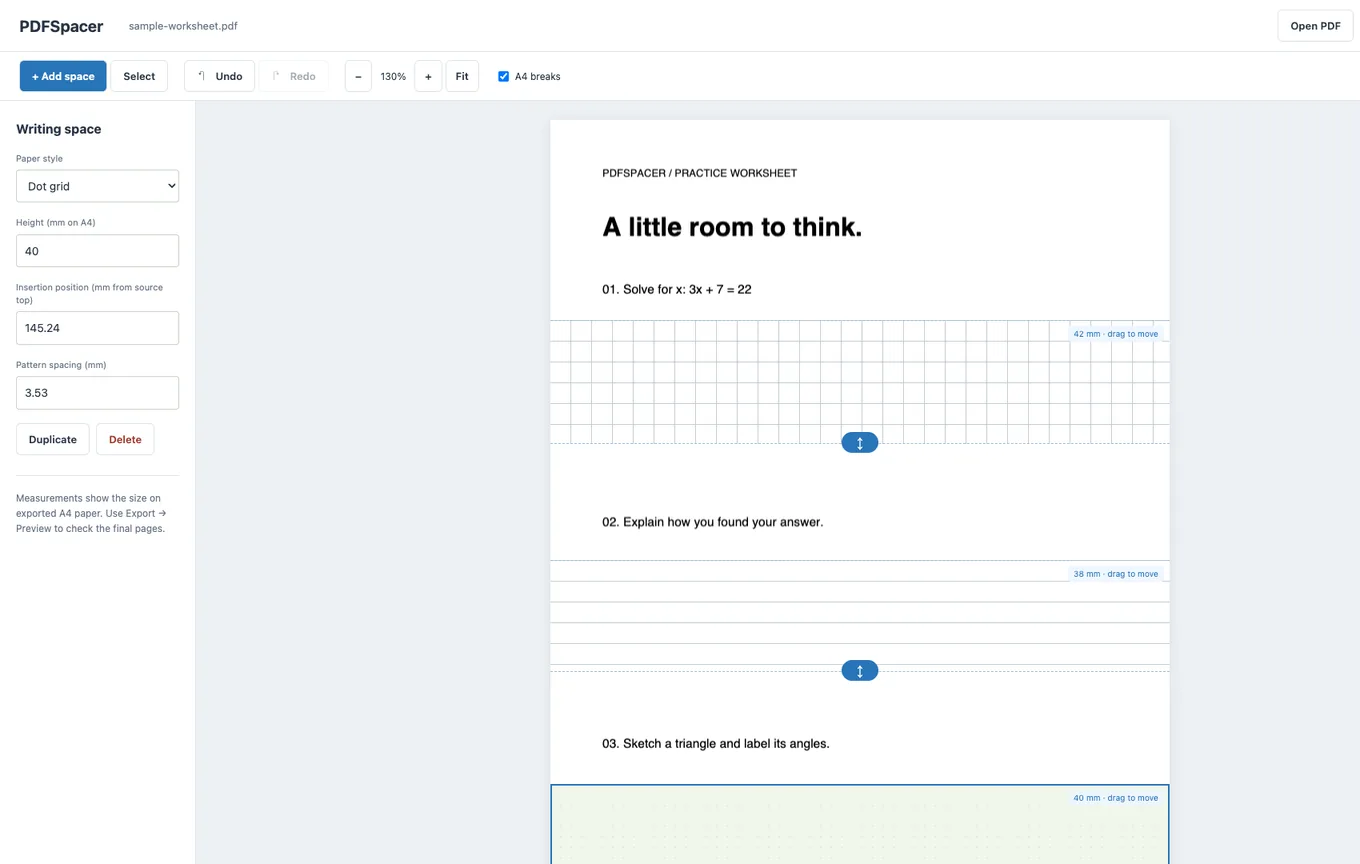
Spacing out a homework sheet
- Open the sheet at PDFSpacer. If the homework is a photo of a textbook page, save it as a PDF first, then open that.
- Click under question 1. A spacer is inserted and the questions below shift down. Choose Squared, Ruled, Plain or Dot grid.
- Set the height once, then duplicate. Press Duplicate and drag the copy under question 2, and so on. Each spacer can still be resized on its own.
- Check the page breaks. With A4 breaks on, nudge any spacer that would leave a question at the very bottom of a page.
- Export and print with Paginated A4, or share the Single Long Page version for pupils working on a tablet.
Compared with a homework spacer script
There are command-line tools that add white space between homework questions automatically, by matching question numbers with a regular expression or a PDF text library. They are fast for a long, cleanly formatted paper, and worth it if you process many identical sheets. They also need Python installed, do not work on scans, and cannot see whether a gap falls in the middle of a diagram.
PDFSpacer is the manual alternative. You decide where each spacer goes and how big it is, which takes a few seconds per question. It works on scanned sheets, on photographed pages saved as PDF, and on documents where the question numbering is inconsistent. Both approaches leave the original text untouched.
For students spacing their own work
If the homework was sent as a PDF and you need to hand it back with answers, add the space yourself and write on the exported file in any annotation app, or print it. The export keeps the original question text, so the teacher sees exactly the sheet they set, with your answers underneath each question.
Reusing a layout
A weekly homework sheet with the same structure only needs spacing once. Use Project then Download layout to save the spacer positions as a small JSON file. When next week's sheet is the same PDF, load the layout and export straight away. The layout is tied to the PDF it was made for, so a different document will need its own layout.
Common questions
Is there a limit on pages or questions?
No. Add as many spacers as you need across as many pages as the PDF has. Very large files are only limited by the memory available to your browser.
Does it change the original questions?
No. The question text and graphics are copied into the new PDF unchanged. Only the vertical position of content below each spacer changes.
Can I use it on a phone?
Yes. Tap to insert or select a spacer, drag its handle to resize it, and use Fit to size the page to the screen. A tablet or laptop is more comfortable for a long sheet.
Is it really free?
Yes. There is no account, no watermark and no paid tier.